


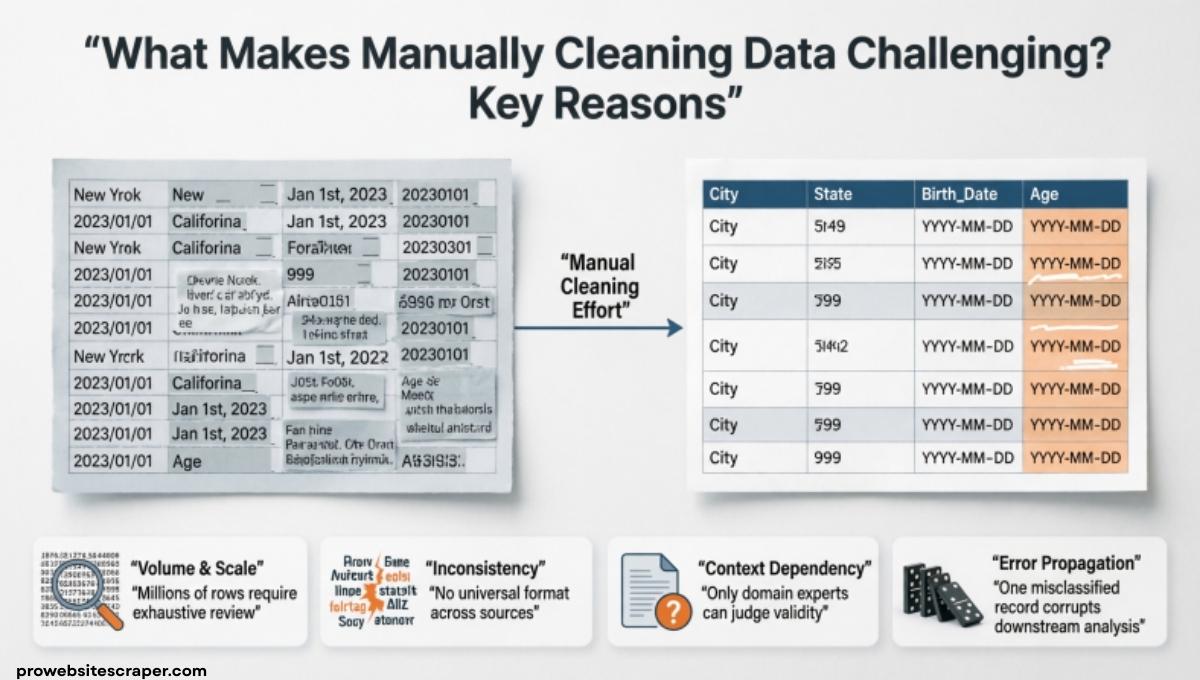
Anyone who works with messy spreadsheets knows what makes manually cleaning data challenging. You start asking things like: Why is cleaning and transposing data important for data analysis? Then more questions pop up, like How are the questions you can investigate with scatter or crosstab charts or Why would someone make a histogram instead of a bar chart. When your data is full of errors, duplicates, and strange formats, even simple analysis can feel frustrating.
In this post, we’ll break down what makes manually cleaning data challenging and explain it in simple terms. You’ll learn why manual data cleaning takes so much time, what common problems people face, and how to think about your data before analysis. By the end, you’ll have a clearer understanding of the process and feel more confident handling messy datasets.
What Is Manual Data Cleaning
Manual data cleaning means a person reviews raw data by hand, finds errors, and fixes them one by one. No automation. No smart tools. Just human effort and time.
It is one of the most critical steps in any data workflow. But it is also one of the most underestimated.
Why Manual Data Cleaning Is Harder Than It Looks
Most people think it is just fixing typos or deleting bad rows. It is far more than that.
Every single entry requires a judgment call. Is this blank cell an error? Is this duplicate real or accidental? These are not questions a formula can always answer for you.
Data quality problems rarely announce themselves. They hide inside cells, behind formatting differences, and within values that look perfectly fine but are not.
Common Challenges of Manual Data Cleaning
There is no single reason this process is hard. It is a combination of many problems hitting you at the same time.
Inconsistent Data Formats
This is the most frequent issue in any raw dataset. The same value appears written in completely different ways.
- Dates: 01/03/2024 vs March 1, 2024 vs 2024-03-01
- Country names: USA vs U.S.A vs United States
- Numbers: $1,200 vs 1200 vs 1.2K
Each variation breaks filters, formulas, and grouping in analysis. Fixing these manually across thousands of rows is slow and exhausting. And it is very easy to miss one.
Duplicate Records
Duplicates enter datasets through data merges, form resubmissions, and copy-paste errors. Simple duplicates are easy to spot. Near-duplicates are not.
Same person. Slightly different spelling. Different phone number. These look like two separate records but are actually one. Catching them manually means comparing rows line by line. That takes serious time.
Missing or Null Values
Empty cells look harmless. They are not.
| Reason for Empty Cell | What It Could Mean | Correct Action |
| Never collected | No data exists | Mark as unknown |
| User skipped field | Intentional blank | Flag for review |
| Accidental deletion | Data was lost | Attempt recovery |
| Zero intended | Value is zero | Fill with 0 |
Every empty cell needs a decision. Making the wrong one corrupts data integrity across the entire dataset. And with manual cleaning, you make hundreds of these decisions without any safety net.
Human Error During the Process
Here is the painful irony. Manual cleaning creates new errors while fixing old ones.
A person working through thousands of rows gets tired. Focus drops. A cell gets overwritten. A row gets accidentally deleted. A wrong value gets pasted in the wrong column.
These mistakes happen quietly. Most of the time, no one notices until the damage is already done. And without a proper audit trail, reversing those mistakes becomes almost impossible.
No Clear Data Standards
Many teams start collecting data without agreeing on rules first. Should dates be MM/DD or DD/MM? Should country names be full or abbreviated?
When there are no standards, every person entering data does it differently. By the time it reaches the cleaning stage, the unstructured data mess is enormous. And fixing it manually is the only option left.
Why Is Cleaning and Transposing Data Important for Data Analysis

Bad data does not just slow you down. It actively misleads you.
Every chart, report, model, and dashboard is only as accurate as the data feeding it. If that data has errors, duplicates, or wrong formats, the output is wrong too. This is what data professionals mean when they say garbage in, garbage out.
Transposing data is restructuring it so rows become columns or columns become rows. This matters because different analytical tools require data in different shapes.
- Pivot tables need data in long format
- Some visualizations need wide format
- Machine learning models need specific column structures
Manually transposing a large dataset is not just tedious, it is genuinely risky. One misaligned row throws off everything that comes after it. This is exactly why data preprocessing is treated as its own dedicated phase before any analysis begins.
Clean, correctly structured data means your analysis reflects reality. That is the entire point.
How Scale Makes Manual Cleaning Even Harder
Small datasets are manageable. Big ones are a completely different problem.
Cleaning 100 rows is annoying but doable. Cleaning 100,000 rows manually is practically impossible to do accurately. The same challenges that feel minor at small scale become overwhelming at large scale.
Data validation, checking that every entry follows a rule, must happen row by row without automation. That is not realistic. It is slow, inconsistent, and still full of gaps.
Cross-referencing values against external lists, detecting outliers, keeping track of every change made, all of these multiply in time and complexity as the dataset grows. There is simply no way to keep up without tools when data reaches a serious volume.
How Are the Questions You Can Investigate with Scatter or Crosstab Charts
Once your data is clean, the chart you choose depends on the question you are asking. Two of the most powerful chart types for investigation are scatter charts and crosstab charts.
Scatter charts explore relationships between two numerical variables.
- Does more experience lead to higher salary?
- Does temperature affect daily sales?
- Does screen time impact sleep quality?
Each dot on a scatter chart represents one data point. The pattern of dots tells you whether a relationship exists, and how strong it is.
Crosstab charts compare categories against each other.
| Question | Chart Type |
| Which region sold more in Q3? | Crosstab |
| Does age affect purchase amount? | Scatter |
| Which product performs best by gender? | Crosstab |
| Does study time improve grades? | Scatter |
If the underlying data was not properly cleaned, both chart types produce misleading results. Dirty data creates false patterns and fake correlations that lead to wrong decisions. This is why data cleaning always comes before visualization, always.
Why Would Someone Make a Histogram Instead of a Bar Chart
This confuses a lot of people. Both use bars. Both look similar. But they answer completely different questions.
A bar chart compares separate, distinct categories against each other. Each bar is its own independent group.
- Sales by country
- Revenue by product line
- Customers by age group label
A histogram shows how a single numerical variable is distributed across a range.
- How are customer ages spread from 18 to 80?
- How are test scores distributed across a class?
- How many orders fall in each price range?
The key difference is that histogram bars are connected. The data is continuous, not categorical. The bars represent ranges, not labels.
Someone chooses a histogram when they want to understand the shape, spread, and frequency of their data. They want to see if the data is skewed, clustered, or evenly spread. A bar chart cannot show any of that. Choosing the wrong one does not just look bad, it communicates the wrong story entirely.
Tools People Use to Avoid Manual Data Cleaning

At some point, most teams realize manual cleaning is not sustainable. They start looking for smarter solutions.
Python is one of the most popular choices. The Pandas library lets analysts clean, transform, and validate datasets using scripts. One script can process thousands of rows in seconds, work that would take a human days.
R is another strong option, especially in research and academic environments. It has powerful packages for data wrangling and statistical cleaning.
For teams that prefer visual tools:
- OpenRefine, excellent for messy text and inconsistent formats
- Trifacta, drag-and-drop data cleaning with smart suggestions
- Excel Power Query, accessible for smaller teams already using Excel
- SQL, powerful for cleaning large structured database records
- dbt, popular in modern data pipelines for transformation at scale
These tools do not eliminate the need for human judgment. But they eliminate the repetitive, error-prone manual labor. That alone saves enormous time and dramatically reduces data errors.
When Manual Cleaning Makes Sense (And When It Does Not)
Manual cleaning is not always the wrong choice. It depends heavily on the situation.
It makes sense when:
- The dataset has only a few hundred rows
- The task is a one-time job not worth automating
- You need full control over every single decision
- The data structure is too unique for a script to handle
It does not make sense when:
| Situation | Why Manual Fails |
| Dataset has 10,000+ rows | Too slow, too many errors |
| Cleaning happens weekly | Not scalable, needs automation |
| Multiple people are involved | Inconsistent rules, conflicting changes |
| High-stakes analysis | Risk of undetected errors is too high |
The smartest teams use both. Human judgment sets the rules. Automation applies them at scale. That combination gives you the best data accuracy without burning out your analysts on repetitive work.
Frequently Asked Questions
Why is manually cleaning data challenging?
Many people struggle because what makes manually cleaning data challenging is errors, duplicates, missing values, and inconsistent formatting.
What are the common challenges in data cleaning?
Common problems explain what makes manually cleaning data challenging, including duplicates, typos, missing values, and inconsistent formats.
What was the most challenging part of cleaning the data?
For many analysts, what makes manually cleaning data challenging is finding hidden errors and fixing inconsistent records.
What are the disadvantages of manual data processing?
Slow speed and human mistakes show what makes manually cleaning data challenging during manual data processing tasks.
What are the 7 disadvantages of a manual system?
The list explains what makes manually cleaning data challenging, including errors, slow work, duplication, storage issues, and poor accuracy.
What are the challenges in manual data entry and processing?
Typing mistakes, inconsistent formats, and missing values explain what makes manually cleaning data challenging in manual data entry.
Conclusion
Manually fixing messy datasets can feel slow and tiring. Many people ask what makes manually cleaning data challenging when they face duplicates, errors, and missing values. Small mistakes can change results and confuse analysis. That is why many beginners wonder, Why is cleaning and transposing data important for data analysis. Clean data helps you see patterns clearly and trust your results. When you understand what makes manually cleaning data challenging, you also learn why accuracy matters in every step of data work.
Good data also helps you answer better questions. Analysts often think about How are the questions you can investigate with scatter or crosstab charts when exploring relationships in data. They also ask Why would someone make a histogram instead of a bar chart to understand distribution better. These questions show what makes manually cleaning data challenging before analysis begins. When data is clean, charts become meaningful and insights become clear. This is why understanding what makes manually cleaning data challenging is important for anyone working with data.
