



Imagine spending hours every day just typing the same data over and over again. Your eyes get tired, mistakes happen, and your real work keeps getting delayed. This is exactly why so many people are searching for the right data entry software and even automated data entry software to finally get their time back.
This blog covers everything you need to know about data entry software in one simple place. You will find clear explanations, real examples, and helpful tips to pick the best tool for your needs. By the end you will know exactly which solution fits your business and how to make data entry stress free for good.
What is Data Entry Software?
Data entry has evolved far beyond simple typing and spreadsheets. Today it is a fully digital and intelligent process. Understanding what this software actually does helps you choose the right tool.
The Basic Idea Behind It
Data entry software is a digital application that captures, processes, and stores information automatically. It replaces paper forms and manual typing with smart electronic systems. Businesses use it to handle large volumes of data without human errors.
It works on computers, tablets, and smartphones. Teams can access and submit data from anywhere at any time. Cloud-based data entry solutions make remote work and real-time collaboration possible.
What Makes It Different From Spreadsheets
Spreadsheets still require human input for every single cell. Data entry software goes beyond that by automating the capture and validation process. It connects directly with your existing business systems for seamless data flow.
Data Entry Software Definition
Knowing the exact definition helps businesses pick the right solution. Not every tool does the same thing. Some are simple while others are fully automated.
Simple Definition
Data entry software is any tool that helps collect, manage, and transfer information digitally. It eliminates the need for paper forms and repetitive manual work. The core goal is speed, accuracy, and efficiency in data collection.
Broader Definition in Business Context
In a business context, this software can mean two things. It can be an electronic form creation tool or a fully automated data capture system. The right choice depends on your data volume and workflow needs.
| Type | Function | Best For |
| Electronic Forms | Digital form creation and submission | Small to mid-size businesses |
| Automated Capture | Auto-extracts data from documents | High-volume data processing |
| AI Data Entry Software | Uses AI to read and classify data | Enterprise-level operations |
| Cloud-Based Tools | Access data from anywhere | Remote and hybrid teams |
Why is Data Entry Software Needed?
Paper and manual processes are holding businesses back. The costs are higher than most companies realize. Data entry software is no longer a luxury, it is a necessity.
The Real Cost of Manual Data Entry
Manual data entry eats up your team’s productive hours every single day. Employees spend time on repetitive tasks instead of strategic work. This directly hurts your business growth and bottom line.
Here are the biggest problems businesses face without proper software:
- Human errors in customer records and accounting files
- High labor costs from hiring data entry teams
- Slow processing that delays important business decisions
- Physical storage costs for paper documents and files
- Poor data accuracy leading to bad business decisions
- No mobile access limiting flexibility for field teams
How It Helps Your Business Grow
Switching to software for data entry removes all these pain points at once. It reduces costs, improves accuracy, and speeds up your entire workflow. Your team can now focus on work that actually drives revenue.
Operational efficiency improves dramatically when manual processes are eliminated. Employees spend their time on high-value tasks. Customers get faster service because their information is always accurate and up to date.
How Does Data Entry Software Work?
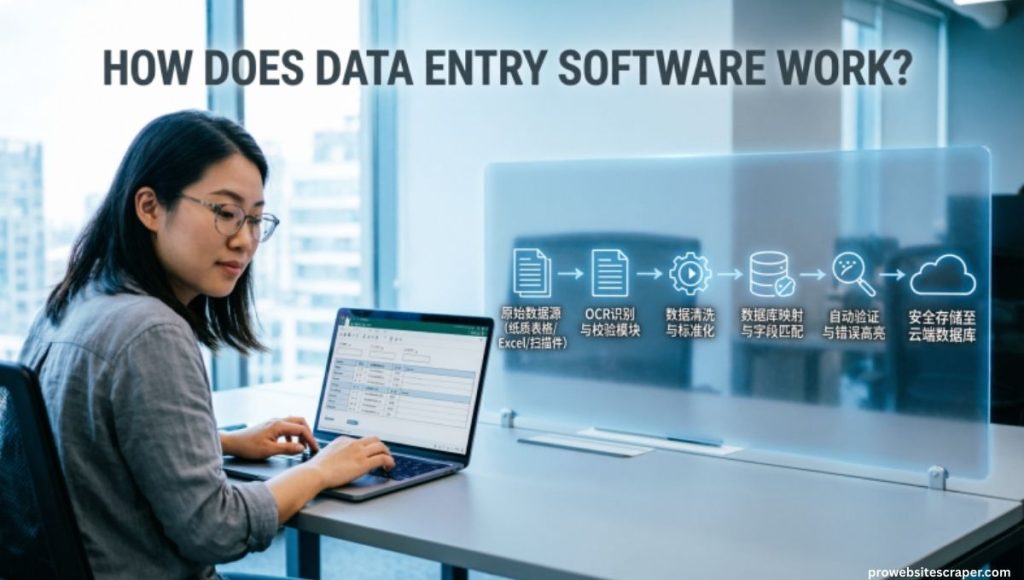
Understanding how this software works helps you use it to its full potential. The process is simpler than most people think. Modern tools are designed to be user-friendly and easy to set up.
Two Primary Functions
Data entry software works through two main functions that serve different business needs.
Function 1, Electronic Form Creation: The software creates digital forms that replace paper ones completely. Employees fill them out on any device from anywhere. Once submitted the data goes directly into your business systems without any manual handling.
Function 2, Automated Document Classification: The software reads incoming documents and automatically identifies what they are. It extracts the important data fields without any human typing. Then it validates and stores everything into your content management system.
The Four Core Technologies Inside
Modern data entry software programs use four powerful technologies to capture data accurately:
- OCR, Optical Character Recognition: Reads and extracts machine-printed text from scanned documents
- ICR, Intelligent Character Recognition: Reads and processes handwritten text and notes accurately
- OMR, Optical Mark Recognition: Detects checkboxes, bubbles, and selection marks on forms
- BCR, Barcode Recognition: Scans and extracts data from barcodes on any document
These technologies work together inside one system. The software uses whichever method suits the document type. This makes data capture accurate across all kinds of incoming files.
The Step-by-Step Process
Here is exactly how automated data entry software processes a document from start to finish:
| Step | Action | Result |
| Step 1 | Document received by software | Auto-identified and classified |
| Step 2 | OCR/ICR/OMR/BCR runs | Key data fields extracted |
| Step 3 | Data validation check | Errors flagged and corrected |
| Step 4 | Data delivered to system | Stored accurately and instantly |
| Step 5 | Workflow triggered | Next business process starts automatically |
Automated Data Entry Software
Automated data entry software is the most powerful version of these tools. It removes human involvement from the entire data handling process. Businesses that use it report massive gains in speed and accuracy.
Why Automation Changes Everything
Manual entry means one person typing one record at a time. Automation means thousands of records processed in minutes without a single human touch. The difference in output is enormous.
Workflow automation built into these tools triggers the next step as soon as data is captured. An invoice received automatically updates accounting records. A customer form submitted instantly creates a profile in your CRM system.
Key Benefits of Automated Tools
- Processes large volumes of data in a fraction of the time
- Eliminates human error from repetitive data tasks
- Reduces labor costs significantly over time
- Improves data accuracy across all departments
- Speeds up business processes and customer response times
- Works 24 hours a day without breaks or mistakes
Data Entry Software Programs
There are dozens of data entry software programs available in the market today. Each one offers different features and is built for different needs. Knowing the categories helps you narrow down your search.
Main Categories of Programs
Form-Based Programs focus on creating and managing digital forms. They are simple to use and great for small businesses starting their digital journey. Examples include tools that replace paper intake forms and surveys.
Document Processing Programs handle the automatic capture and extraction of data from incoming files. They are built for businesses that receive high volumes of invoices, contracts, and applications. These tools connect directly with enterprise content management systems.
AI-powered programs use machine learning to get smarter over time. The more documents they process the better they get at identifying and extracting data. These are the most advanced tools available today.
Data Entry Software Examples
Seeing real-world examples makes it easier to understand what these tools actually do. Different industries use different types of solutions. Here are some of the most common use cases.
Real Business Use Cases
| Industry | Use Case | Software Function |
| Healthcare | Patient intake forms | Electronic form submission |
| Finance | Invoice processing | Automated data extraction |
| Retail | Inventory updates | Barcode recognition (BCR) |
| Logistics | Shipment tracking | OCR document scanning |
| HR | Employee onboarding forms | Digital form creation |
| Legal | Contract data extraction | AI-powered document capture |
Common Examples in Daily Business
- Transcription tools that convert audio notes into formatted digital text
- Customer database updaters that copy information between platforms automatically
- Accounting data entry tools that pull figures from journals directly into systems
- Survey and feedback forms that collect and store responses without manual work
These data entry software examples show how broad and useful this category really is. Every industry has a specific need that these tools can meet. The key is matching the right tool to the right problem.
Best Data Entry Software
Choosing the best data entry software comes down to your specific business requirements. There is no single best tool for everyone. The right choice depends on volume, budget, and existing systems.
What to Look For
Ease of use is the first thing to evaluate. If your team cannot figure it out quickly it will not get used. Look for tools with clean interfaces and simple setup processes.
Integration capability is equally important. The software must connect with your existing CRM, ERP, and content management system. Disconnected tools create more problems than they solve.
Features That Matter Most
- Cloud-based access for remote and hybrid teams
- Mobile compatibility for field staff and on-the-go entry
- Data validation to catch errors before they enter the system
- Automated workflows that trigger next steps without human input
- OCR and ICR support for document scanning and extraction
- Scalability to grow with your business needs
Software for Data Entry, PC and Cloud Options
Businesses today have two main deployment options. They can use data entry software for PC installed locally or go with cloud-based solutions. Both have their advantages depending on your setup.
PC-Based vs Cloud-Based
| Feature | PC-Based Software | Cloud-Based Software |
| Access | Only on that specific device | From any device anywhere |
| Cost | One-time license fee | Monthly subscription |
| Updates | Manual updates needed | Automatic updates always |
| Collaboration | Limited to local network | Real-time team collaboration |
| Security | Local control | Provider-managed security |
| Scalability | Limited by hardware | Scales instantly |
Data entry software for PC works well for businesses with sensitive data that must stay on local servers. However most modern businesses prefer cloud solutions for their flexibility and lower upfront costs.
Common Data Entry Software Features
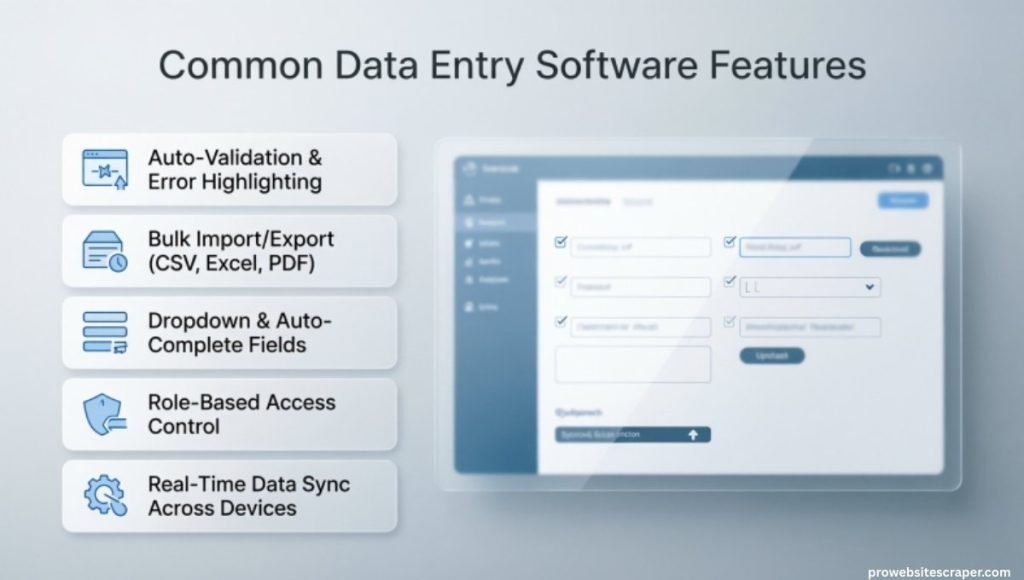
Every good common data entry software tool shares a set of core features. These features separate useful tools from ones that create more problems. Always check for these before making a decision.
Must-Have Features List
- Electronic form builder with drag-and-drop simplicity
- Auto-fill functionality that pulls existing data from connected systems
- Real-time sync across all devices and team members
- Error detection and validation before data is saved
- Document scanning with OCR and ICR support
- Role-based access to protect sensitive information
- Audit trail to track who entered or changed what data
- Export options to Excel, PDF, and other formats
Features That Improve Team Efficiency
Auto-fill saves enormous time when updating customer records. The software pulls existing information and fills in fields automatically. Staff only need to verify rather than type everything from scratch.
Real-time sync means every team member sees the same up-to-date data. There are no version conflicts or outdated records. This is especially important for sales, support, and operations teams working together.
AI Data Entry Software
AI data entry software represents the future of this entire category. It uses artificial intelligence and machine learning to go beyond simple automation. These tools actually learn and improve the more you use them.
How AI Makes Data Entry Smarter
Traditional software follows fixed rules to extract data. AI-powered tools understand context and meaning behind the data. They can handle unstructured documents that older tools cannot process at all.
For example an AI tool can read a handwritten doctor’s note and extract the diagnosis, medication, and patient details automatically. A traditional OCR tool would struggle with messy handwriting. AI data entry software handles it with impressive accuracy.
Also Read About: What Makes Manually Cleaning Data Challenging? Key Reasons
Why Businesses Are Switching to AI Tools
- AI learns from corrections and gets more accurate over time
- It handles unstructured data from emails, PDFs, and scanned notes
- Reduces the need for human review and verification
- Processes documents faster than any human team could
- Integrates with enterprise search and records management systems
- Delivers significant cost reduction in data processing operations
AI data entry software is no longer reserved for large enterprises. Affordable AI-powered tools are now available for small and mid-size businesses too. The barrier to entry has dropped significantly in recent years.
The Future of Data Entry Is Already Here
Businesses that adopt AI data entry software today are building a strong competitive advantage. Their operations run faster, their data is cleaner, and their teams are more productive. The gap between early adopters and late movers grows wider every year.
Digital transformation is not optional anymore. Every business that relies on data, which is every business, needs a modern data entry solution. The question is not whether to switch but how soon.
Frequently Asked Questions
Which Software is Best for Data Entry?
The best data entry software includes tools like Microsoft Excel, Zoho Forms, and Kofax.
What are Data Entry Softwares?
Data entry softwares are digital tools that help capture, store, and manage business information efficiently.
Can I Self Learn Data Entry?
Yes, you can self learn data entry using free online courses, tutorials, and practice software.
Is Data Entry Still in Demand?
Yes, data entry is still in demand especially in healthcare, finance, retail, and logistics industries.
Is AI Replacing Data Entry Jobs?
AI data entry software is automating repetitive tasks but human oversight and verification are still needed.
How Can I Make $2000 a Week Working From Home?
Freelance data entry software skills on platforms like Upwork and Fiverr can earn you great income.
Conclusion
Data entry software is no longer optional for modern businesses. It saves time, cuts costs, and reduces human errors significantly. Every business handling large volumes of data needs the right data entry software today. Automated data entry software makes the entire process faster and smarter. Your team can finally focus on work that actually grows the business.
Choosing the right data entry software is a game changer for any organization. It improves accuracy, speeds up workflows, and lowers labor costs dramatically. Automated data entry software works around the clock without breaks or mistakes. The best data entry software connects smoothly with your existing business systems. Start using smart data entry software today and watch your business efficiency transform completely.
